
SIM overview
On the Admin web UI Home page, the SIM Status panel shows SIM status information.
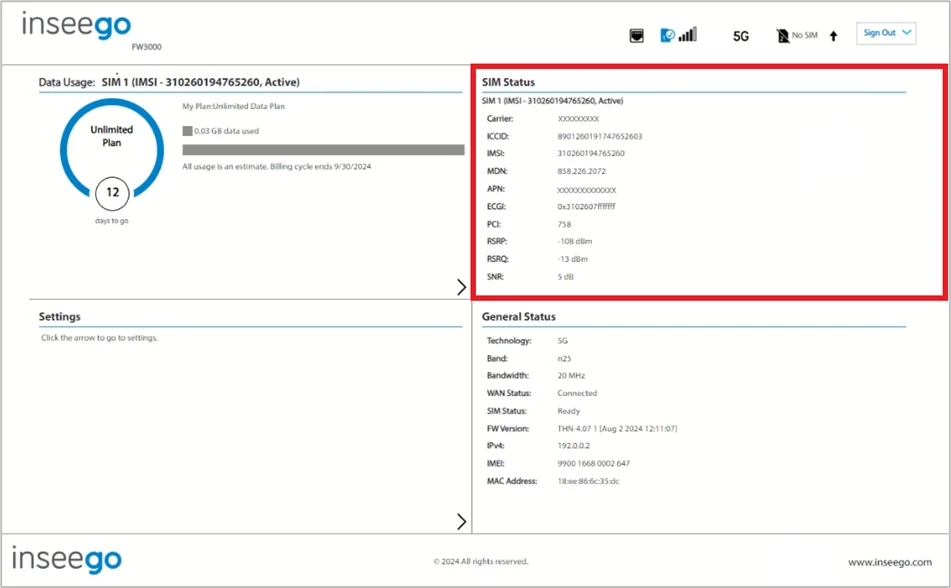
- SIM: The active SIM on which data is displayed.
- Carrier: The name of the Mobile Network Operator.
- ICCID: The unique ID number assigned to the SIM card.
- IMSI: The International Mobile Subscriber Identity (IMSI) for your FW3000. This is a unique number, usually fifteen digits, that identifies a Global System for Mobile Communications (GSM) subscriber.
- MDN: The phone number of your FW3000.
- APN: The access point name for your FW3000.
- ECGI: E-UTRAN Cell Global Identifier. This is a 15-digit code used to identify cells globally.
- PCI: The physical cell ID, used for downlink synchronization.
- RSRP: The strength of the cellular signal, measured in dBm. Higher absolute values indicate a stronger signal, for example: -80 dBm is a stronger signal than -90 dBm.
- RSRQ: Reference Signal Received Quality. A calculated value from RSRP and RSSI that provides a measure of signal and interference.
- SNR: Signal to Noise Ratio. The ratio of signal power to noise power expressed in decibels. SNR is a positive value, and higher numbers are better.
SIM management settings vary depending on whether you are using the Admin Web UI or Inseego Connect.
SIM tab (Admin Web UI) – Use to enable/disable automatic SIM switching and lock/unlock your SIM with a pin. Select Settings from the web UI side menu and then select the SIM tab.
SIM Management (Inseego Connect) – Use to enable automatic SIM switching, SIM failback, signal strength switching, and data usage switching. These configurations are available with Inseego Connect under Mobile Network.