
Indicator LEDs
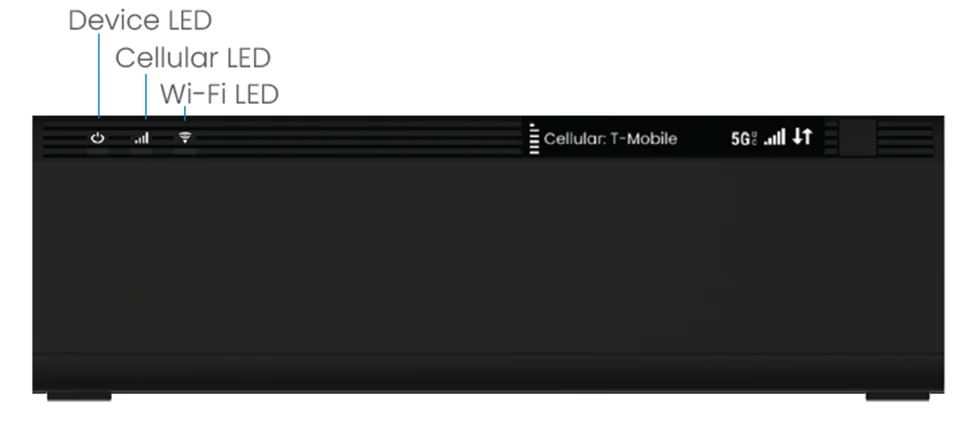
The front of the router has a device status LED, a cellular status LED, and a Wi-Fi status LED. Each LED changes colors and blinks or glows solid to communicate current states for the device.
Note
NOTE: You can turn off the indicator LEDs in the admin web UI with Administration > Preferences.
Device LED
| LED | Color | Operation | Meaning | |
|---|---|---|---|---|
| Blue | Solid | Device on 5G | ||
| Green | Solid | Device on LTE | ||
| Yellow | Solid Blinking | Software update is available Software update is downloading/installing | ||
| White | Solid Blinking | Device on, Ethernet WAN Device booting up | ||
| Red | Solid Blinking | Device error Software update failed |
Cellular LED
| LED | Color | Operation | Meaning | |
|---|---|---|---|---|
| Blue | Solid | Great signal (5 bars) | ||
| Cyan | Solid | Good signal (4 bars) | ||
| Green | Solid | Fair signal (3 bars) | ||
| Yellow | Solid | Poor signal (2 bars) | ||
| Red | Solid Blinking | Very poor signal (1 bar) No signal/no network | ||
| White | Blinking | Searching for signal |
Wi-Fi LED
| LED | Color | Operation | Meaning | |
|---|---|---|---|---|
| Blue | Solid Blinking | Wi-Fi on, mesh Mesh pairing mode | ||
| Green | Solid | Wi-Fi on, no mesh | ||
| White | Blinking | Wi-Fi initiating/rebooting | ||
| Red | Solid | Wi-Fi error | ||
| Off | Off | Off | Wi-Fi off |
The WAN/LAN ports on the back of the router also have indicator LEDs.
| LED | Color | Operation | Meaning |
|---|---|---|---|
| Green | Solid Blinking Off | Indicates Ethernet connection speed 1000 Mbps (Gigabit) Data is being transferred 10/100 Mbps | |
| Amber | Solid Off | Indicates port status Port is being connected, but no data is being transferred Port is being disconnected |